
How to Download Commission Statements from Blue Cross Blue Shield of Michigan
Step 1: Log In to Blue Cross Blue Shield of Michigan
Go to the Blue Cross Blue Shield of Michigan login page.
Enter your credentials to log in.
You will see the main dashboard.
Step 2: Select Group or Individual
At the top of the page, choose either 'Group' or 'Individual' based on your needs.
If both options are available, either one will work.
Step 3: Access Quick Links 0:17
Click on 'Quick Links' in the menu.
Step 4: Navigate to Commission Statements
Select 'Commission Statements' from the Quick Links menu.
This will open a new tab.
Step 5: Wait for Single Sign-On to Load
The page may take a moment to load and might appear gray during this time.
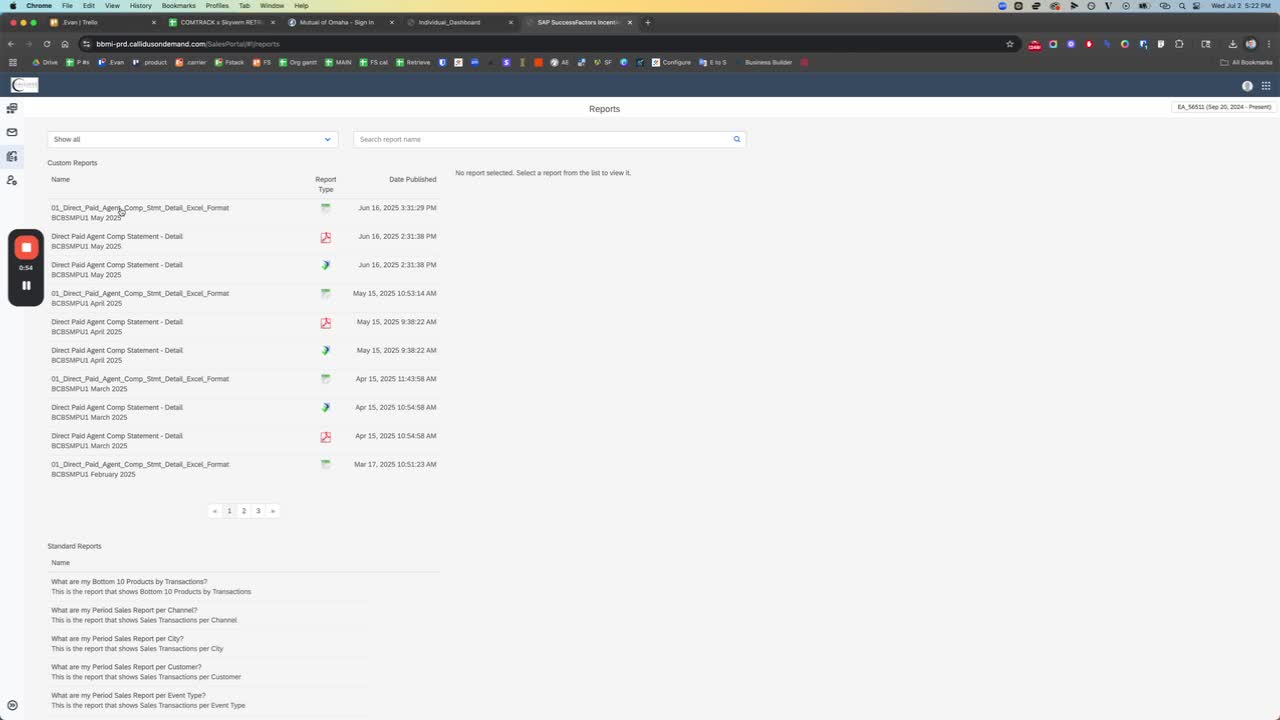
Step 6: Download the Report
Look for the download icon on the page.
Click on any report that is labeled as 'Excel'.
Reports are available for different months (e.g., May, April, March).
Step 7: Confirm Download
The download for the selected report (e.g., May) should start automatically.
You may need to name the file (e.g., 'Blue Cross Blue Shield Michigan May 2025').
Step 8: Handle Pop-Up Notifications
Be aware that a pop-up may appear indicating that a download is about to start or that you are about to view sensitive information.
If you accidentally selected 'Do not show this again', you may not see this pop-up.
Step 9: Suggest Improvements
Consider suggesting that the system automatically confirms the download if a pop-up appears, to streamline the process.